
Why Is My Monnett Home Feed Empty? How to Fill It in Less Than 10 Minutes
Published on September 3, 2026
You’ve downloaded Monnett, picked your handle, checked the Discover page, then switched to Home page and… there’s nothing. No posts, no suggestions, no endless stream of strangers.
That’s on purpose. An empty Home page is exactly how Monnett is supposed to work on day one.
Why the Home page starts empty
On most big platforms, the first thing you see is a feed chosen for you by an algorithm. On Monnett we don’t do that. Your Home page only shows posts from people you follow, in chronological order. So no people followed means no posts yet.
The Discovery page is where new people and new content live. That’s where you go to fill your Home page. (Or by inviting your friends to join you.)
How to find new accounts to follow and fill in your Home page
Step 1: Go to Discover page
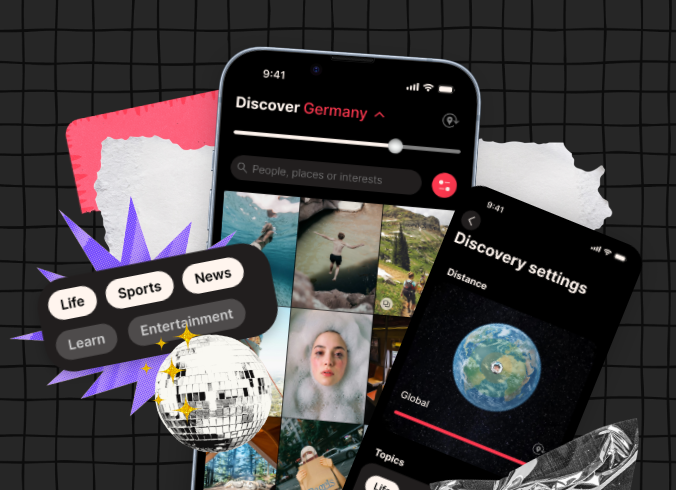
Tap the magnifying glass icon in the navigation bar. Discovery shows a grid of posts from people you haven’t met yet, and a search bar and the proximity filter at the top.
Step 2: Tell Monnett what you want to see
In the top-right corner of Discovery, next to the search bar, you’ll find the Discover settings. Use them to choose what you want to see on Monnett.
First there’s the Distance setting that lets you decide if content from the near you (city, country) should be prioritized. Move the slider to decide how your feed should show. If there’s no more content the search will turn to the global results.
The second way to filter content is by category. You can choose from: Entertainment, Learn, Life, News, Sport, and the newer Art and Travel.
To select or deselect a category simply tap on it. If you uncheck certain categories, the content marketed as such will not show up when you explore your Discover page.
Step 3: Search by interest
The search bar works on people and interests. Words in post captions are searchable, and hashtags are supported too, so try things like “photography”, “hiking” or a hashtag you’d use yourself.
Step 4: Follow people you like
When you find a profile that appeals to you, tap follow. Their posts will start appearing on your Home page straight away, newest first. When you follow 10 to 20 accounts, your Home page will start to fill up with the content and no longer feel empty.
Step 5: Bring your friends
Monnett is at its best when people you actually know are on it. Send your profile link to friends, even if they haven’t installed the app yet. See our guide: How to Share Your Monnett Profile and Invite Your Friends. If someone has already joined, search their handle in Discover and follow them.
Step 6: Post something yourself
A quiet network gets less quiet when someone speaks first. Share a photo or video, pick a category, and add a location so people nearby can find you sooner.
Quick fixes if things still feel off
- Nothing loads or a post fails to upload: check your connection first. If that’s fine, try a smaller photo or video file.
- “Internal server error” when registering: your registration may have gone through. Try logging in with the same details before signing up again.
- Still stuck? Use the contact form to reach out to our support team for help.
A note on community size
Monnett has passed 100,000 people, but it is still a young network, and it will feel smaller than Instagram or TikTok. That is a trade-off for joining Monnett this early. What you get in return is a feed with no algorithm deciding what you see and a community that is still small enough for you to help shape.
Join 100,000+ people
Be a person, not a user. Sign up and invite your friends to join you!
Related Articles
September 27, 2026

May 7, 2026

June 30, 2026